Writeup of Unit42 Sherlock challenge
Solving the Unit42 sherlock by analysing Sysmon logs
Intro
The Unit42 Sherlock challenge covers a campaign by a threat actor that abused UltraVNC to main access to systems. The challenge gives you a Sysmon log file and sends you on your way with a few guidelines:
- Event ID 1: Process Creation/Execution. Includes process path, parent process path, and command-line arguments.
- Event ID 2: File Creation Time Changed. Includes the file making the change, the file to which the change is being made, tampered timestamp, and original timestamp.
- Event ID 3: Network Connection. Includes the process making the connection, destination IP Address, and port.
- Event ID 5: Process Termination. Includes the name of the process that was killed or terminated itself.
- Event ID 11: File Created. Includes the process creating the file, the file being created, and its full path.
- Event ID 22: DNS Query. Includes the process querying the domain, the target domain name, and the IP Addresses they resolve to.
So let’s take a look at the challenge.
Question 1
How many Event logs are there with Event ID 11?
Now I have to be honest with you dear reader, I don’t want to use Windows more than I have to. To avoid parsing the log through something like Windows Event Viewer, I tried to search for some alternative that would provide a GUI and would run on Linux. To my surprise, I found a project written in Rust that does just this. The repository is available here, while the creator was kind enough to also create a web application that is hosted on https://omerbenamram.github.io/evtx/.
I don’t recommend uploading files with sensitive information to random web applications, but since I was avoiding Windows and this was for a CTF, I accepted the risk.
Having uploaded the file, the web application kindly showed the number of occurrences for each event ID.
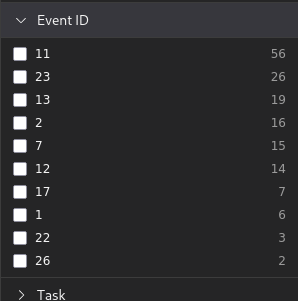 Event IDs ordered by number of occurrences
From the image it’s simple to extract that the answer is: 56.
Question 2
Whenever a process is created in memory, an event with Event ID 1 is recorded with details such as command line, hashes, process path, parent process path, etc. This information is very useful for an analyst because it allows us to see all programs executed on a system, which means we can spot any malicious processes being executed. What is the malicious process that infected the victim's system?
As the questions itself hints, to find the answer we need to look at event ID 1 entries. Luckily there are only 6 entries with one being:
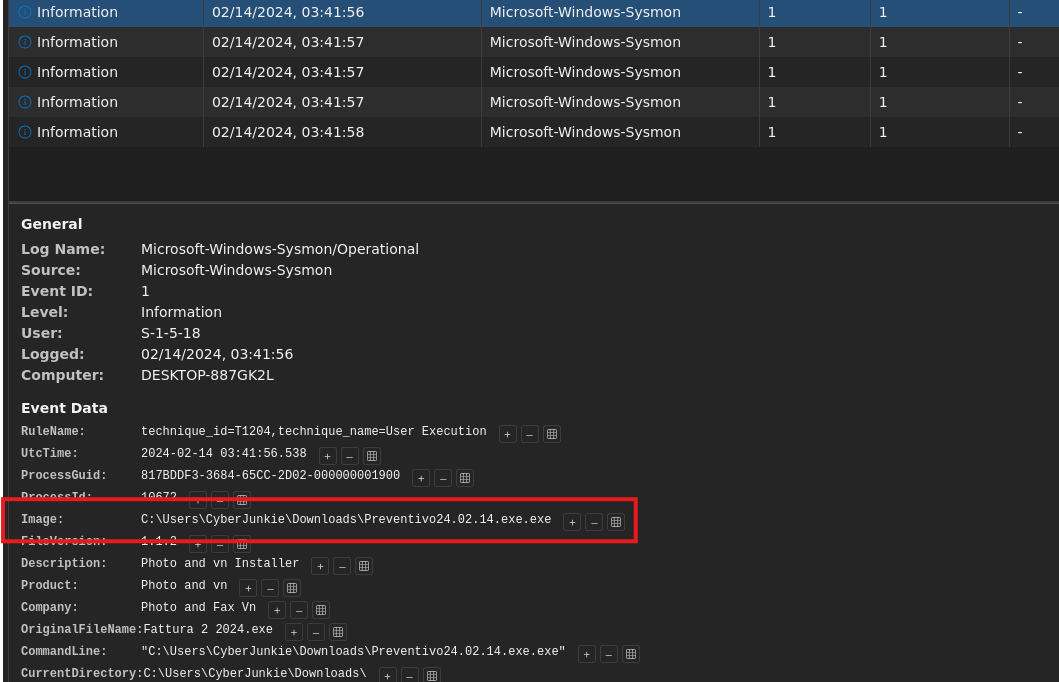 Contents of an Event ID 1 entry
The double extension stands out as very suspicious, and by searching VirusTotal with the SHA-1 hash we get the following result:
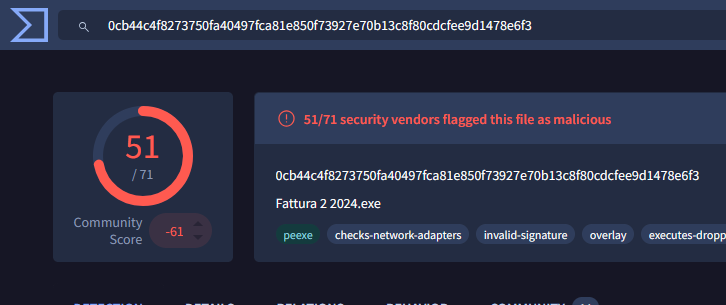 Results of VirusTotal
This confirms that the binary is malicious and results in the answer being: C:\Users\CyberJunkie\Downloads\Preventivo24.02.14.exe.exe
Question 3
Which Cloud drive was used to distribute the malware?
This can be found out by looking at entries under event ID 22, as that event ID tracks DNS queries.
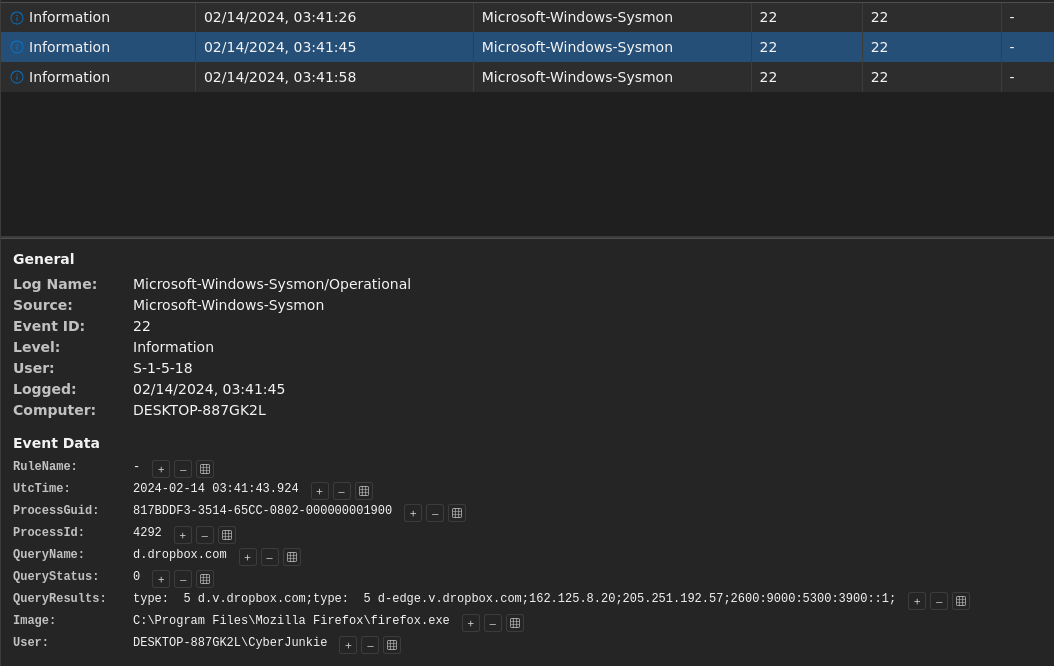 DNS query for dropbox.com
Luckily there are only 3 entries for this event ID, so it’s trivial to identify the answer as: dropbox.
Question 4
For many of the files it wrote to disk, the initial malicious file used a defense evasion technique called Time Stomping, where the file creation date is changed to make it appear older and blend in with other files. What was the timestamp changed to for the PDF file?
As explained in the description of the challenge, event ID 2 logs the change of file creation times. So by simply looking at the event ID 2 entires we see the following:
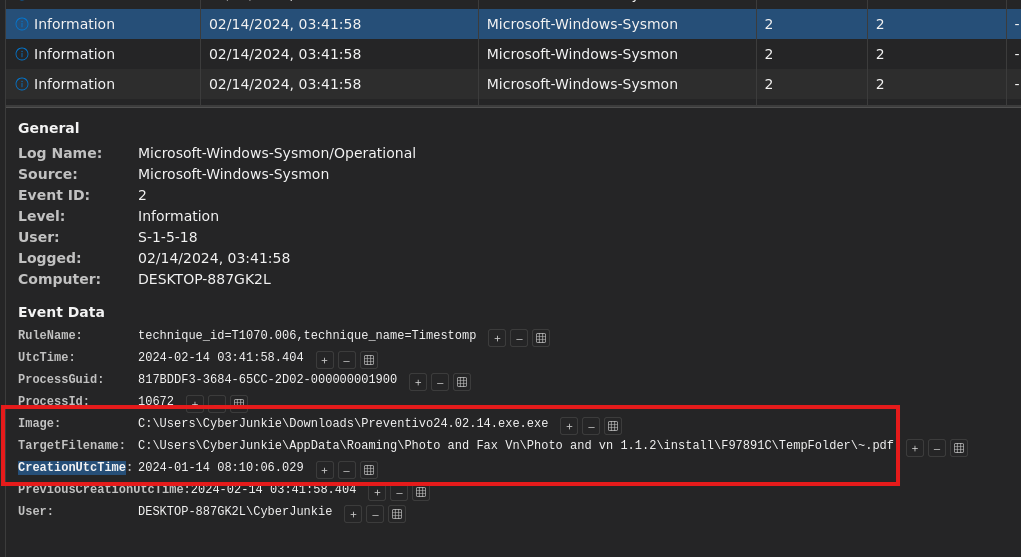 Event ID 2 entry performing an operation on a file called
 ~.pdf
The binary that performs the change is the previously identified Preventivo24.02.14.exe.exe meaning the answer for this question is the new creation time set by it: 2024-01-14 08:10:06.
Question 5
The malicious file dropped a few files on disk. Where was "once.cmd" created on disk? Please answer with the full path along with the filename.
The answer to this question can be found by filtering the log for event ID 11 AND the value of image being Preventivo24.02.14.exe.exe.
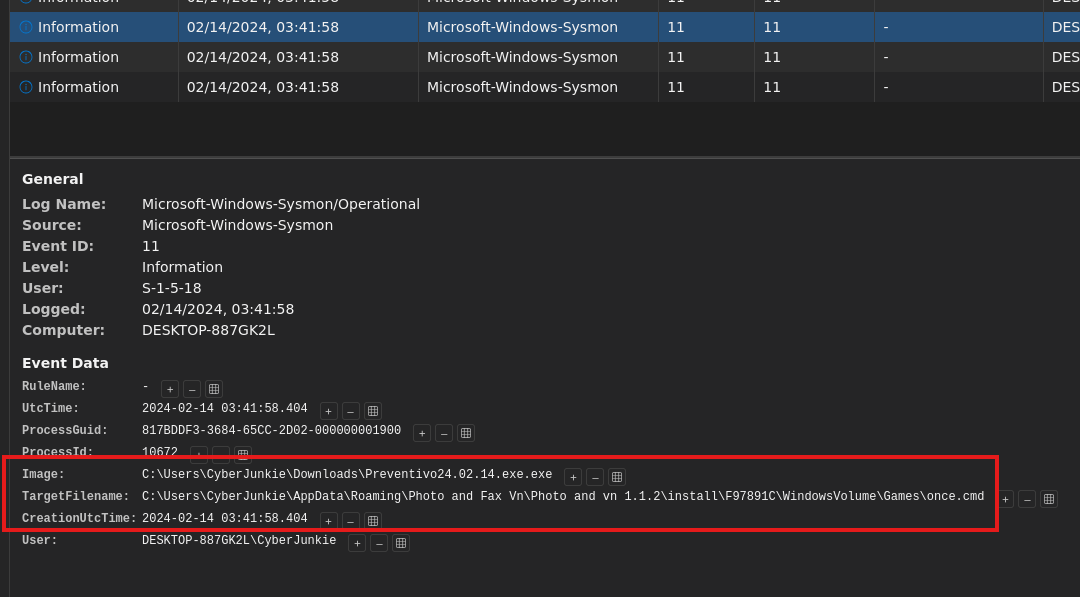 Once.cmd creation time and path
By reading the TargetFilename value we get the answer to the question: C:\Users\CyberJunkie\AppData\Roaming\Photo and Fax Vn\Photo and vn 1.1.2\install\F97891C\WindowsVolume\Games\once.cmd
Question 6
The malicious file attempted to reach a dummy domain, most likely to check the internet connection status. What domain name did it try to connect to?
Some malware may attempt to access some domain, or generally test internet connection, to bypass sandboxing environments and avoid detection. To find what domain the sample tried to communicate to, we simply filter for event ID 22 which shows DNS requests.
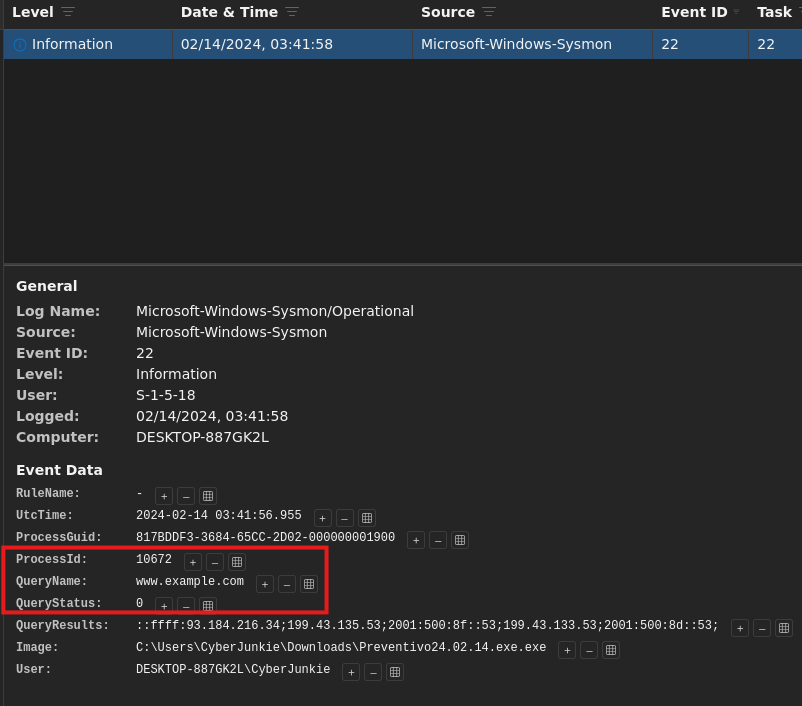 Domain lookup made by the malicious sample
From the entry we can conclude that the answer is: www.example.com.
Question 7
Which IP address did the malicious process try to reach out to?
In a similar way as in the previous question, we can find the answer this time by filtering the log by event ID 3 which shows network connections.
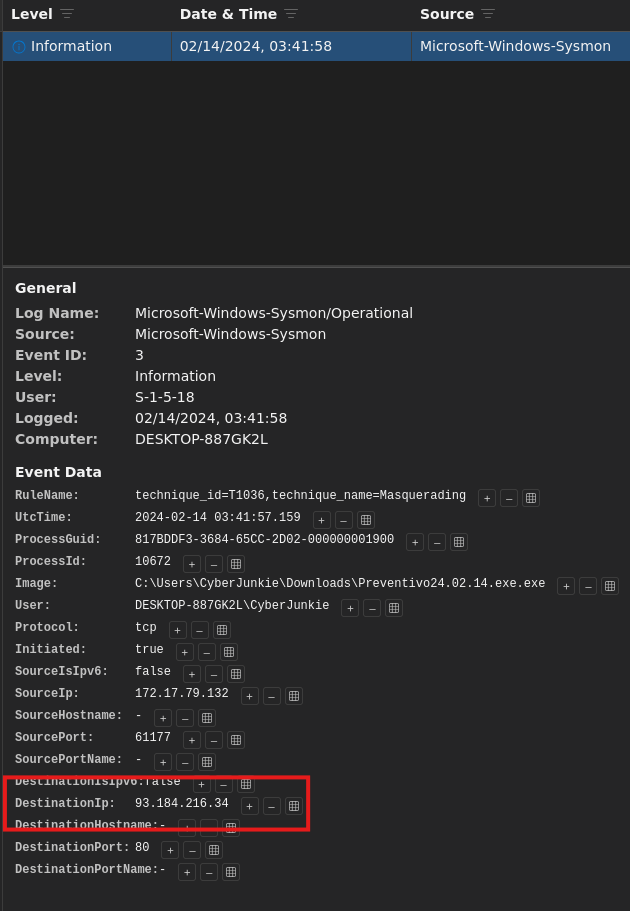 Network connection made by the malicious sample
The entry clearly shows the answer to be: 93.184.216.34.
Question 8
The malicious process terminated itself after infecting the PC with a backdoored variant of UltraVNC. When did the process terminate itself?
The last question can be answered by filtering for event ID 5.
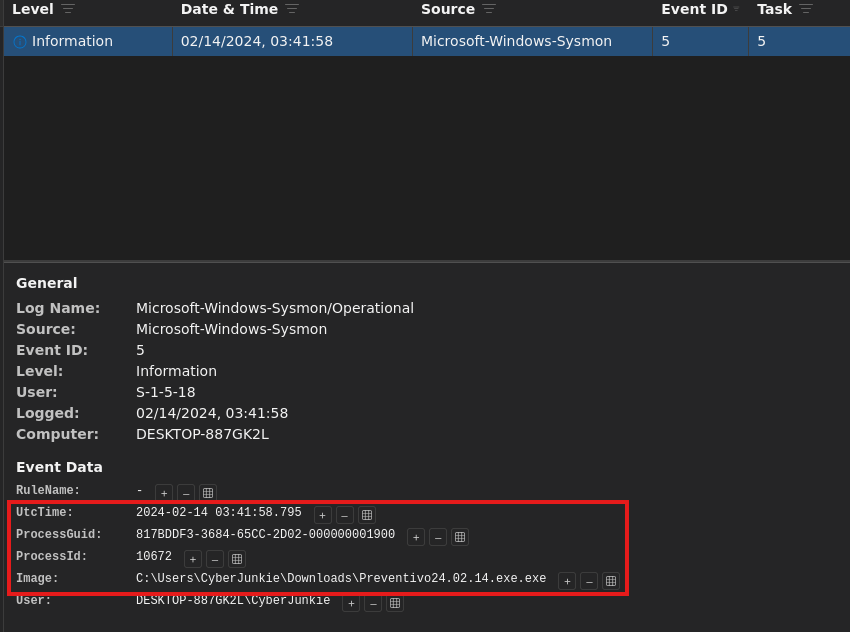 Malicious process terminated and logged
The Sysmon log is kind to show the termination time of the process, which also gives up the answer to the last question: 2024-02-14 03:41:58.
Extra Mile
I wanted to dig a bit more into the batch scripts the malware creates and runs, but using the hashes in the challenge did not yield with anything. I then moved on finding the report by Unit42 that discusses this campaign which was when I stumbled across the following IOC file: https://github.com/PaloAltoNetworks/Unit42-timely-threat-intel/blob/main/2024-01-23-IOCs-from-UltraVNC-infection.txt.
The repository contained the hashes for three batch scripts:
-
1ce4768f825372d55c1d30ce3ac41afb913de6299a64ae5b0ac1b3b752421d64for on.cmd, -
c2ab7b8701bdc36198a8f01791c8a3479ef3e8bcc6ccd3bd8c2f60dd9672e8e1for c.cmd, - and
b3c509fc687793ed75f2792540efbdab88d65ca18570c28651da737cac6544b7for cmd.txt
I was able to download samples for the first 2 hashes, but could not find the sample for the last hash (at least not on MalwareBazaar).
The samples I did download did not contain anything noteworthy. They would query the registry and call the next batch script, so without the final script there isn’t much to analyze.
You are free to take a shot at finding the last part and to analyze it.
Samples disclosed inside this section contain real malware and you should be careful when handling them. I take no responsibility if you mess up your PC.
Feel free to comment your findings below if you choose to pursue it.